props Kullanımı 
Örnek
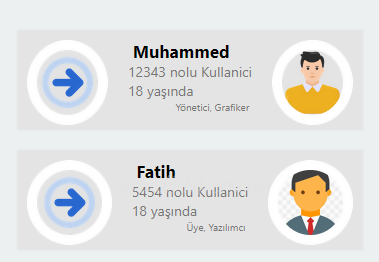
Kullanıcı.js
import React from "react";
import {View, Image, Text, StyleSheet} from "react-native";

const Kart=(props)=> {
  return (
    <View style={Stiller.Kapsayici}>
    <Image source={require("./resimler/right-arrow-37.png")} style={[Stiller.Resim, Stiller.Yuvarlatici]} />
    <View style={{flexDirection:"column", padding:10}}>
        <Text style={Stiller.Yazi}> {props.Ozellikler.Adi} </Text>
        <Text style={Stiller.Silik}>{props.Id} nolu Kullanici</Text>
        <Text style={Stiller.Silik}>{props.Ozellikler.Yasi} yaşında </Text>
        <Text style={[Stiller.Silik, {textAlign:"right", fontSize:10}]}>{props.Uyelikleri[0]}, {props.Uyelikleri[1]} </Text>
      </View>
      <Image source={{
              uri: props.Ozellikler.ResimUrl
            }} style={[Stiller.Resim, Stiller.Yuvarlatici]} />
    </View>
  )
}

const Stiller = StyleSheet.create ({
Kapsayici : {
  //flex:2,
  flexDirection:"row",
  height:100,
  backgroundColor:"#e4e4e4",
  margin:10
},
  Resim : {
  flex:0.5,
    width:80,
    height:85,
    margin:10,
    border:"10px solid #fff"
  },
  Yuvarlatici : {
      borderRadius : 50+'%',
  },
  Yazi : {
      //textAlign:"center",
      //alignContent:"center",
      fontSize:17,
      fontWeight:"bold",
      //border:"1px solid #000"
  },
  Silik : {
    color:"#777",
  }
});

export default Kart;
App.js
import { StyleSheet, Text, View } from 'react-native';

import Kart from './components/Kullanici';

export default function App() {
  return (
    <View style={styles.container}>
    <Kart Id="12343" Uyelikleri={["Yönetici", "Grafiker"]} Ozellikler={{ResimUrl:"https://cdn-icons-png.freepik.com/512/6218/6218538.png", Adi:"Muhammed", Yasi:18}} />
    <Kart Id="5454" Uyelikleri={["Üye", "Yazılımcı"]} Ozellikler={{ResimUrl:"https://www.clipartmax.com/png/small/47-470043_icons8-flat-businessman-person-icon-png.png", Adi:"Muhammed", Yasi:18}} />
    </View>
  );
}

const styles = StyleSheet.create({
  container: {
    flex: 1,
    justifyContent: 'center',
    backgroundColor: '#ecf0f1',
    padding: 8,
  },
});